report-kit
Turn a small JSON spec into a single-file, interactive HTML report. Built for AI assistants: the model writes compact JSON, report-kit renders it into a consistent, safe, versioned report with charts, diagrams, tables, and a feedback loop back to the model.
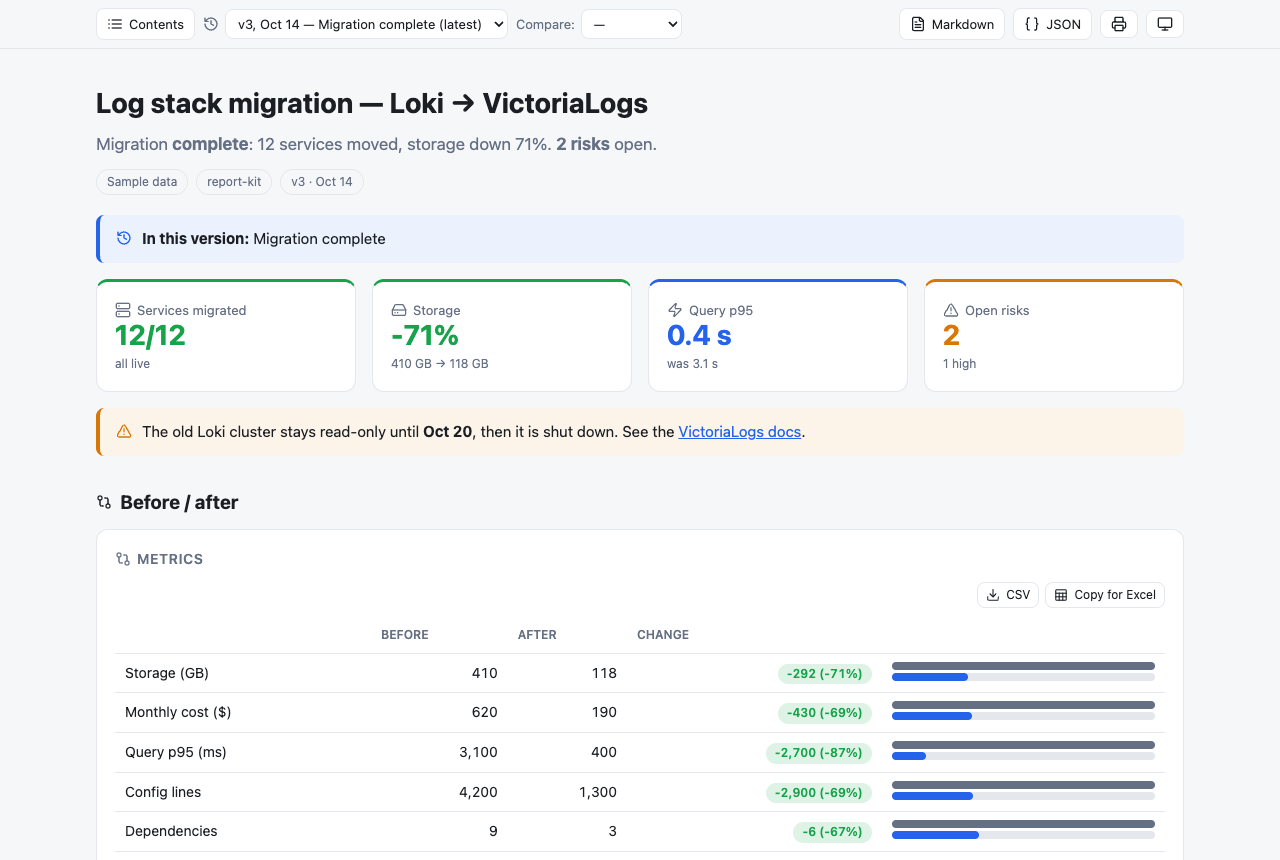
- Fewer tokens. The model writes data, not layout. In the bundled example, v2 of the report is 638 characters of JSON because unchanged blocks are referenced, not repeated.
- Same look every time. One renderer, one design system, light and dark themes, works on mobile.
- Safe by construction. Every string is rendered with
textContent. Raw HTML in the data is shown as text, never executed. - Versioned. Append a new version to the file; readers can switch between versions and compare any two.
- Two-way. Readers answer questions, approve or reject items, tick to-dos and leave notes. One button copies everything as Markdown, ready to paste back into the AI chat.
Live demo: https://omert11.github.io/report-kit/examples/migration-report.html
Quick start
<!doctype html><meta charset="utf-8"><meta name="viewport" content="width=device-width,initial-scale=1">
<script src="https://cdn.jsdelivr.net/gh/omert11/report-kit@0.3.0/report-kit.min.js"></script>

<script type="application/json" class="rk-v">
{"title":"Weekly deploy summary","sum":"3 releases shipped, **0 rollbacks**.",
 "blocks":[
  {"kpi":[["Releases",3,"good"],["Rollbacks",0,"good"],["Lead time","1.2 d","info"]]},
  {"chart":"bar","title":"Deploys per day","x":["Mon","Tue","Wed","Thu","Fri"],"y":[1,0,1,0,1]},
  {"review":["Ship v2.4 on Monday","Freeze deploys during the migration window"],"title":"Approve"}
 ]}
</script>
Save the snippet as an .html file and open it in a browser. You don’t need a build step or a server.
| CDN URL | Use |
|---|---|
https://cdn.jsdelivr.net/gh/omert11/report-kit@0.3.0/report-kit.min.js |
Pinned version (recommended) |
https://cdn.jsdelivr.net/gh/omert11/report-kit@0.3/report-kit.min.js |
Latest 0.3.x patch |
https://cdn.jsdelivr.net/gh/omert11/report-kit@0.3.0/report-kit.js |
Unminified |
Chart.js, Mermaid and Lucide icons are lazy-loaded from jsDelivr only when a report uses them.
Using it with an AI assistant
Give the model SCHEMA.md (under 1k tokens) and ask it to write reports as report-kit JSON. Then:
- The model writes
report.htmlwith one<script class="rk-v">block. - You open the file. You can answer questions, approve or reject items, and leave notes on any card.
- Click Copy responses and paste the result into the chat.
- The model appends a new
<script class="rk-v">block. Earlier versions stay untouched, and anything unchanged is referenced with{"ref":"id"}.
Validate the result without a browser:
npx --yes github:omert11/report-kit report.html
# ✓ report.html: 3 version(s), ok
# ✗ report.html: v2 blocks[3] chart: y.Errors length ≠ x length (5)
The same checks run in the browser. Problems are listed at the top of the report and counted in <html data-rk-problems="N">, which makes headless checks easy.
Features
Versions and comparison
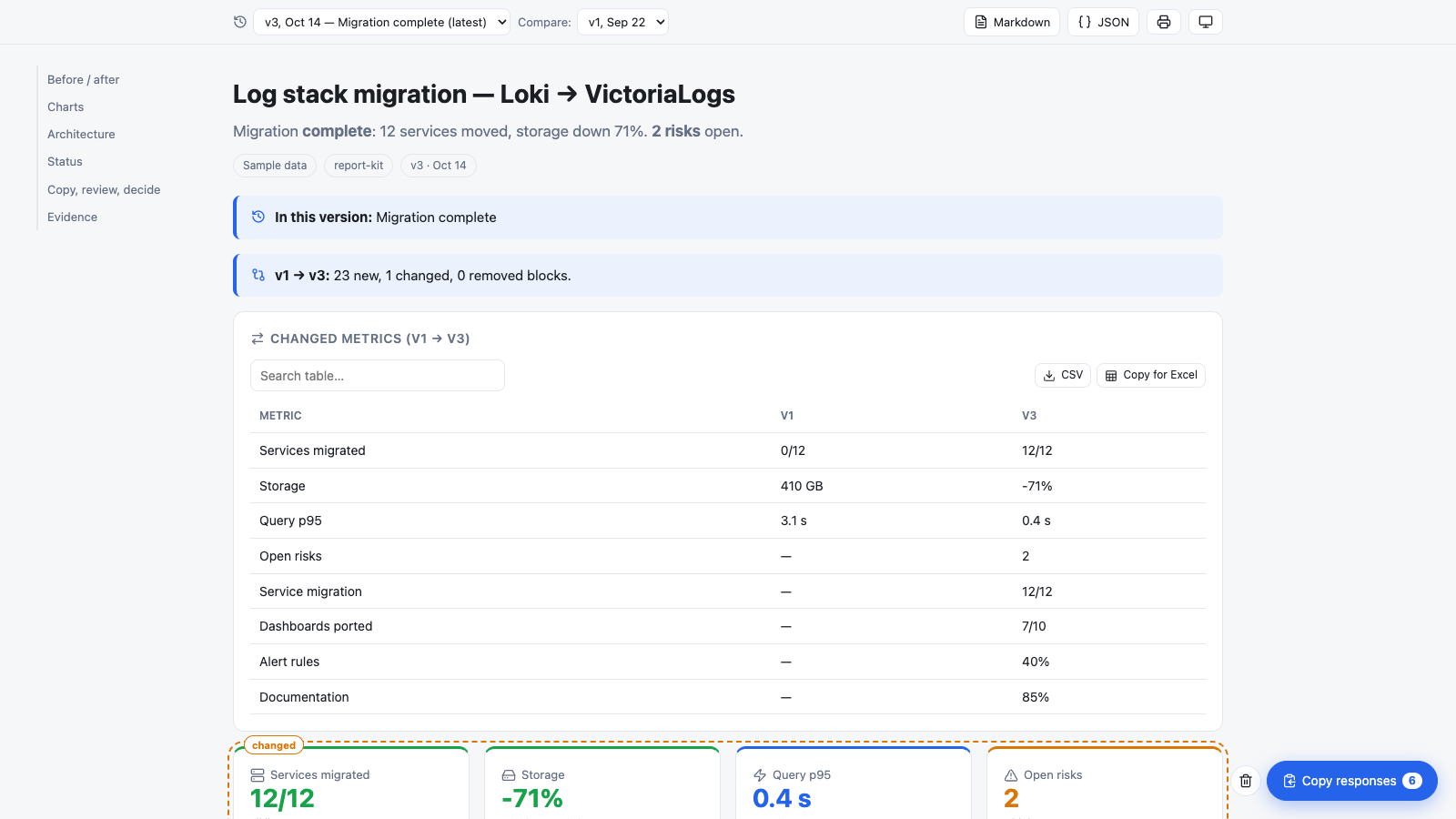
Every <script type="application/json" class="rk-v"> is one version, in file order. title, sum, meta and lang are inherited from the previous version. Pick a version from the toolbar, or link to one directly with #v=2. Compare shows a summary of new, changed and removed blocks, a table of changed KPI and progress values, and outlines every changed block.
Interaction and the single copy button
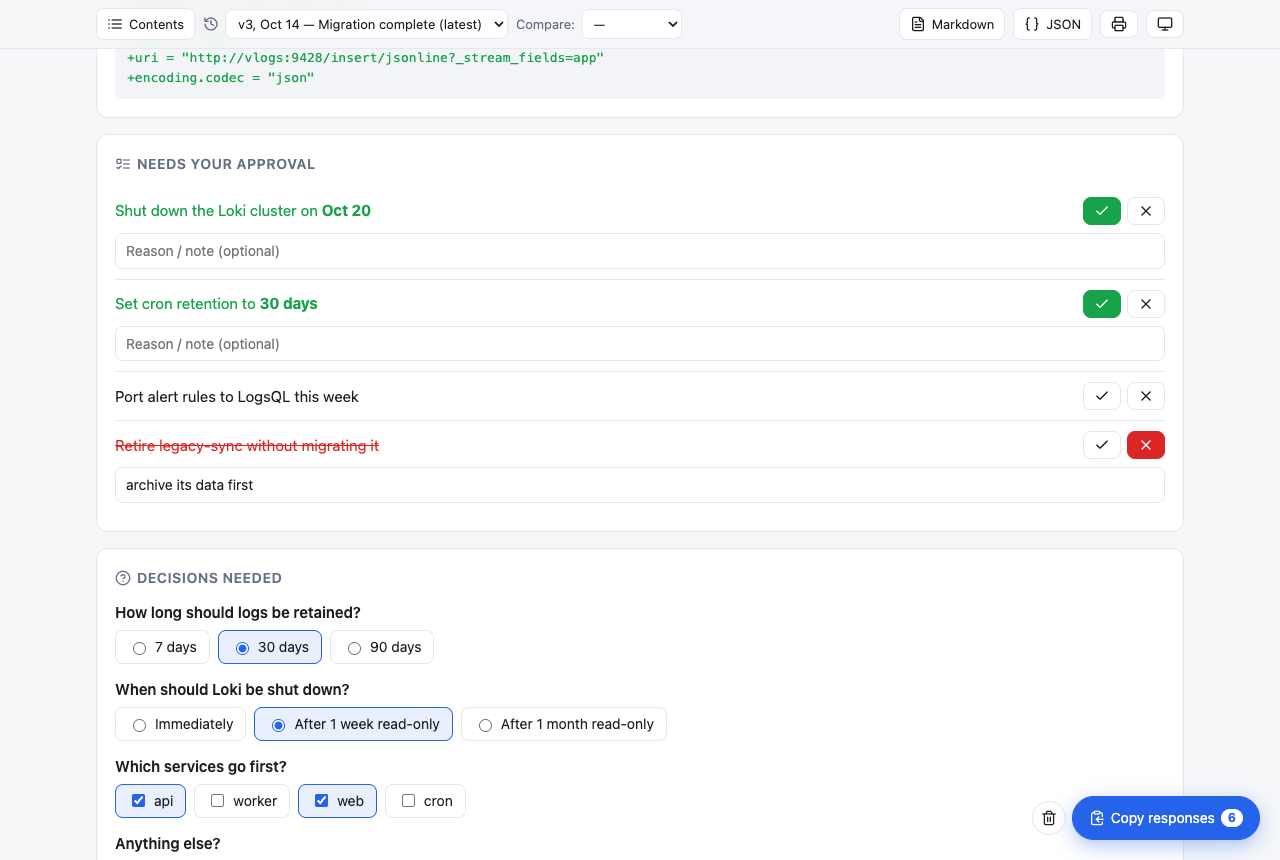
ask (single choice, multiple choice or free text), review (approve or reject with a reason), clickable todos, and a note box on every card. Responses are stored in localStorage. When there is at least one response, a single Copy responses button collects all of them:
Report: Log stack migration — Loki → VictoriaLogs (v3, Oct 14) — my responses

## Decisions
- How long should logs be retained? → 30 days
- Which services go first? → api, web

## Approve / reject
- ✓ Approved: Shut down the Loki cluster on **Oct 20**
- ✗ Rejected: Retire legacy-sync without migrating it — archive its data first
Tables and export
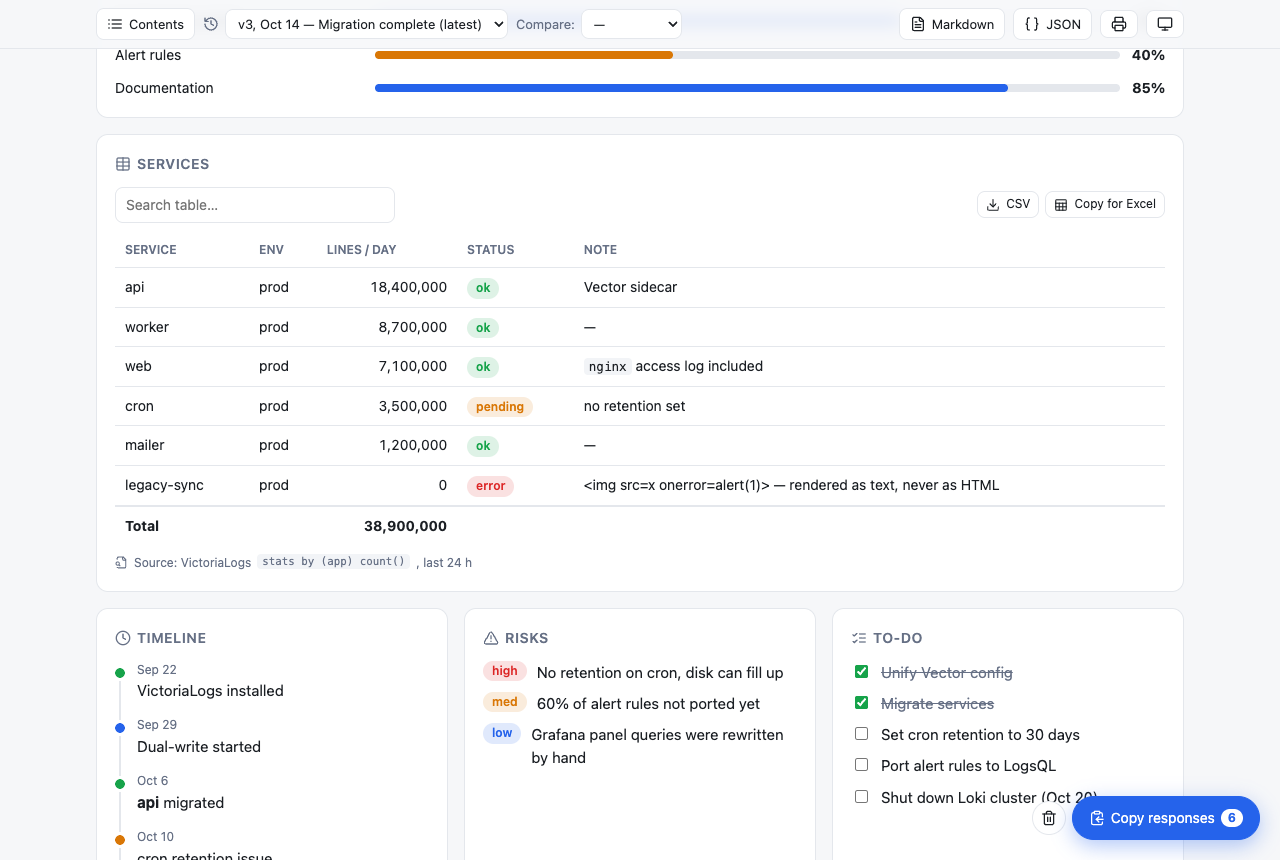
- Sortable columns.
- A search box appears automatically on tables with more than 5 rows.
- Status words (
ok,pending,error, …) become badges. "total": trueadds a totals row, recalculated from the filtered rows.- Tables can be written as rows or as an array of objects.
- CSV downloads the current view: filtered and sorted, with a UTF-8 BOM and
;separators, so Excel opens it in columns even in locales that use a decimal comma. - Copy for Excel copies tab-separated values.
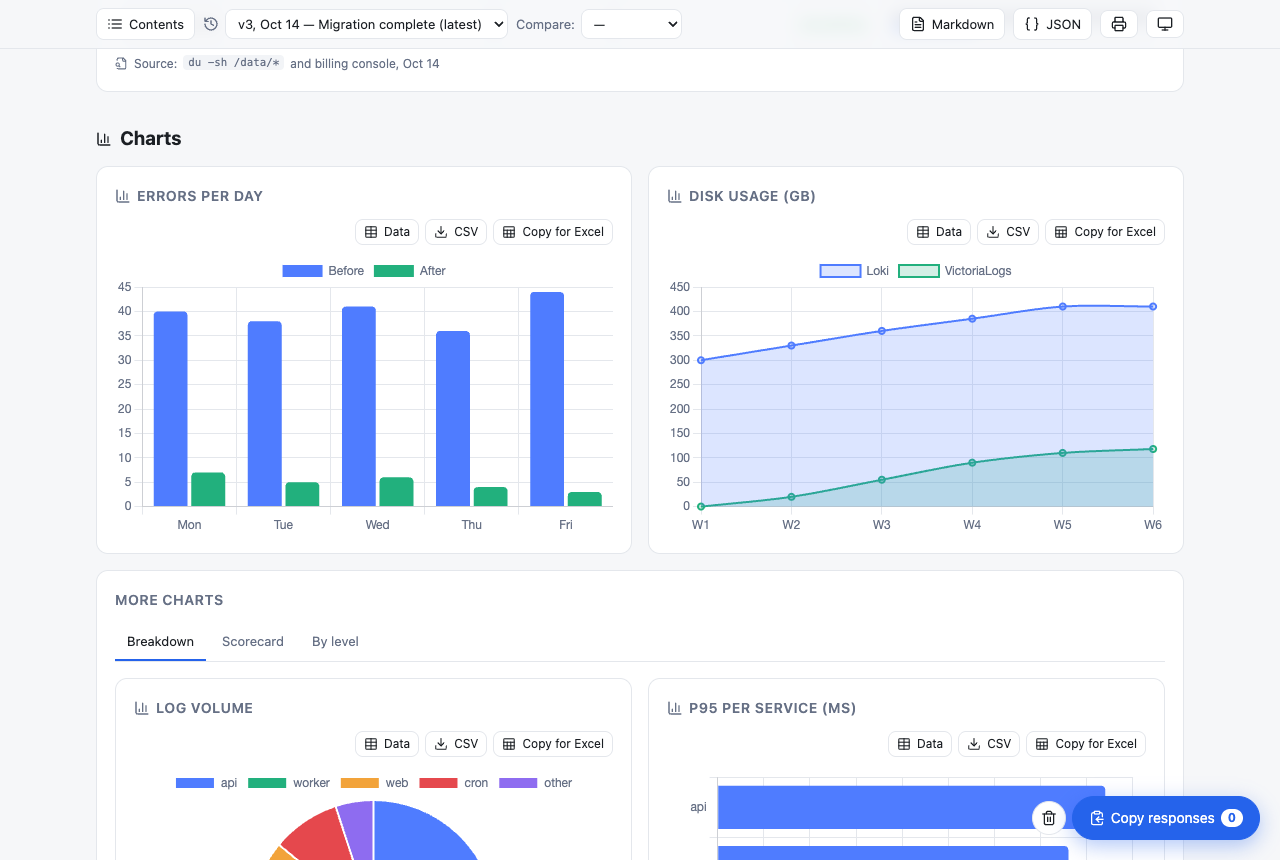
- Charts and diffs export the same way, and a chart’s Data button shows the underlying numbers.
Charts, diagrams, themes
- 8 chart types (Chart.js).
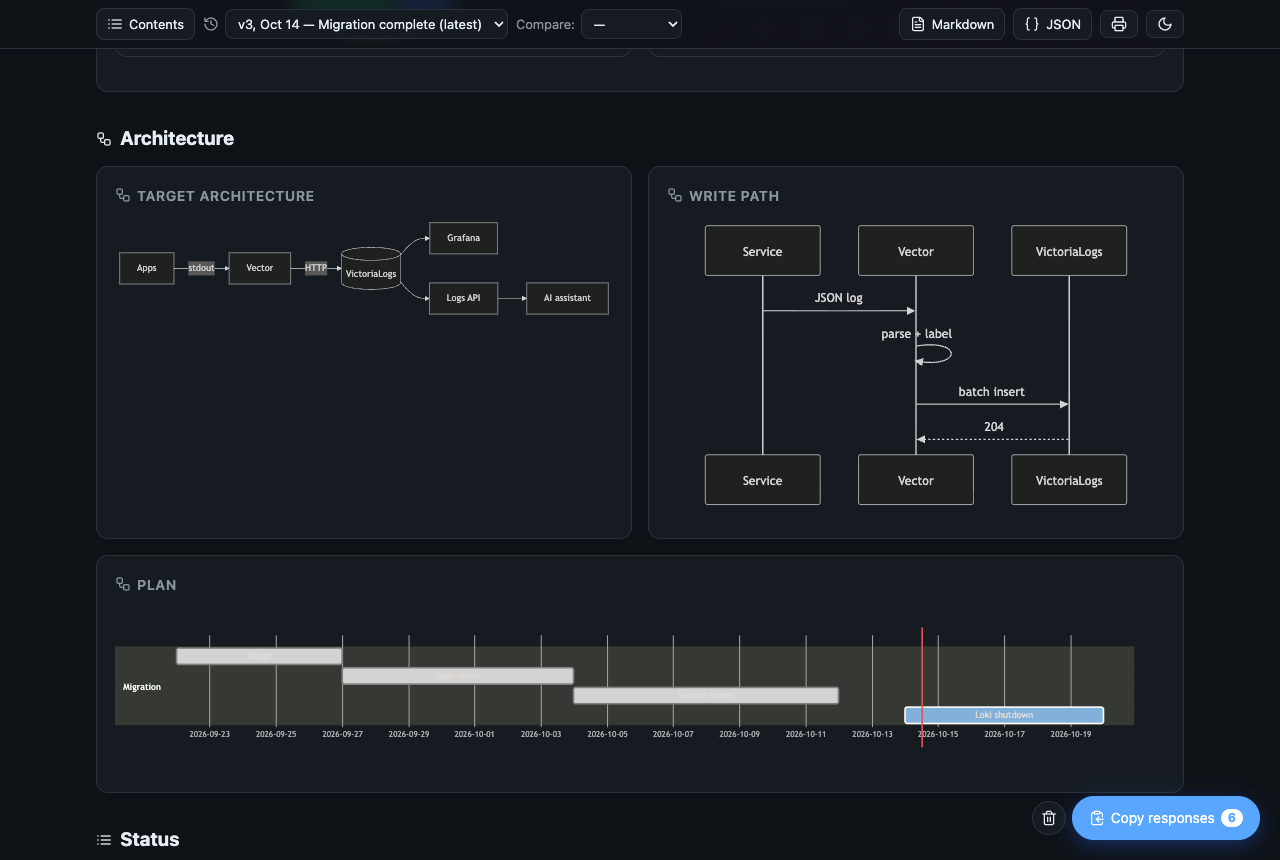
- Any Mermaid diagram: flowchart, sequence, gantt, and more.
- Tabs, columns and collapsible sections.
- Before/after image slider.
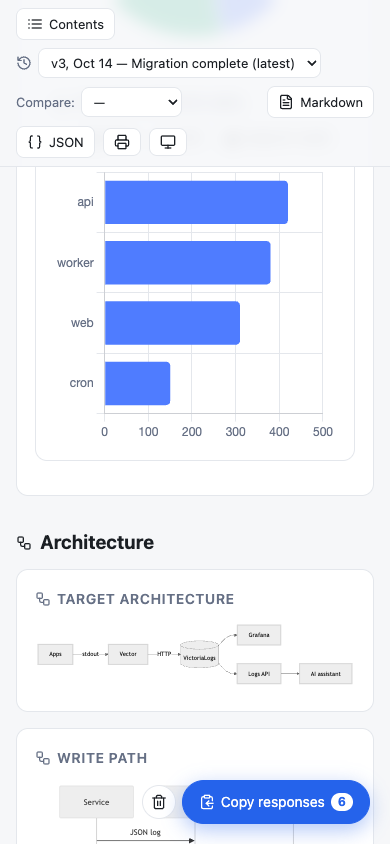
- Table of contents: a sticky sidebar on wide screens, a menu on narrow ones.
- Auto, light and dark themes.
- Print-friendly layout.
- Markdown and JSON export of the whole report.
| Charts | Dark mode | Mobile |
|---|---|---|
 |
 |
 |
Block reference
A block is an object whose type key holds its data. Any block can also have:
title: card headingicon: a Lucide icon nameid: used byrefand by version comparisonsrc: a “Source:” line shown under the card
| Type | Shape | Notes |
|---|---|---|
h |
"Heading" |
Section heading; listed in the table of contents |
p |
"Text with **bold**, \code`, link”` |
Inline Markdown subset |
callout |
"Text", tone |
tone: good | bad | warn | info |
kpi |
[[label, value, tone?, sub?, icon?], …] |
Stat cards |
progress |
[[label, value, max=100, tone?], …] |
Progress bars |
diff |
{before:{k:n}, after:{k:n}}, good, labels |
good: "down" colors decreases green; per-key object allowed |
chart |
"bar", x:[…], y:[…] or y:{series:[…]}, height |
bar hbar stacked line area pie doughnut radar |
flow |
"mermaid source" |
Rendered with securityLevel: "strict" |
table |
[[header…],[row…]] or [{col: value}, …], total, search |
Sort, search, totals, CSV / Excel |
timeline |
[[when, text, tone?], …] |
|
code |
"source", lang |
lang: "diff" colors + / - lines; copy button |
copy |
"text to paste", text, lang |
Command or message with a copy button |
risk |
[[text, high\|med\|low], …] |
|
todo |
["text", ["text", true], …] |
Readers can tick items |
review |
["text", ["id", "text"], …] |
Approve / reject with an optional reason |
ask |
[{id, q, opt?, multi?, ph?}, …] |
Choice or free-text questions |
faq |
[[question, answer], …] |
Collapsible; searchable when there are more than 4 |
img |
"url" or {before, after}, labels, cap |
Before/after drag slider |
sources |
[[text, cmd\|file\|link\|db, ref], …] |
Where the numbers came from |
tabs |
{"Tab": [blocks], …} |
|
cols |
[block, block, …] |
Responsive columns |
details |
"Summary", blocks: […] |
Collapsible section |
ref |
"id" |
Reuse the newest earlier block with this id |
Top-level fields per version: title, sum, meta (chips), date, note (what changed), lang (en | tr), v (label, defaults to its position), blocks.
Security
- All text goes through
textContent. The inline Markdown subset is parsed into DOM nodes, neverinnerHTML. - Links must be
http(s)and open withrel="noopener noreferrer". Image URLs withjavascript:,vbscript:or non-imagedata:schemes are dropped. - The only
innerHTMLis Mermaid’s SVG output, rendered withsecurityLevel: "strict". - The bundled example puts
<img src=x onerror=alert(1)>in a table cell; it is displayed as plain text.
Languages
The UI ships in English and Turkish. Set "lang":"tr" on the first version, or use <html lang="tr">. Adding a language means adding one object to I18N in report-kit.js; pull requests are welcome.
Browser support
Current Chrome, Edge, Firefox and Safari. The renderer uses CSS :has() and color-mix(). Reports need network access for the lazy-loaded Chart.js, Mermaid and Lucide.
Development
git clone https://github.com/omert11/report-kit && cd report-kit
python3 -m http.server 8000   # open http://localhost:8000/examples/migration-report.html
node bin/rk-check.js examples/*.html
report-kit.js is a single dependency-free file. It also works as a CommonJS module in Node (require("./report-kit.js").validate(versions)), which is what the CLI uses.